


Hanging signs are the ultimate aesthetic upgrade for your Minecraft base. They offer a sleeker, more professional look than those chunky traditional signs we’ve used for years. Whether you’re labeling a potion shop or marking your secret bunker, these items add instant “pro-builder” vibes.
Getting these signs isn’t just about grabbing wood and hitting a crafting table. You need specific materials to unlock this sleek design. While the recipe remains consistent across all platforms, the prep work is where most players get stuck.
Ready to transform your base from basic to brilliant? Let’s dive into the wood-chopping, chain-clanking details of how to make a hanging sign in Minecraft.
The Recipe: What You’ll Need
To craft a hanging sign, you need more than just standard planks. You need to get a bit more “industrial” with your resources. Make sure you have these items in your inventory:
2 Chains: Crafted from iron ingots and iron nuggets.
6 Stripped Logs: Use an axe on any log to strip the bark.
Any Wood Variety: Cherry, Bamboo, Oak, or Mangrove all work.
The wood type you choose determines the sign’s final color. Want a vibrant look? Go with Cherry. Looking for something sturdy? Dark Oak is your best friend.
📖 Read More: How to Download Minecraft Skins: Guide for PC, Console & Mobile
The Crafting Grid Layout
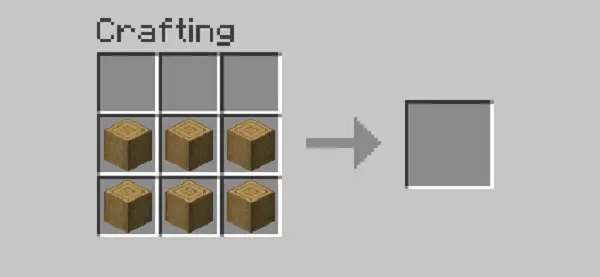
Open your crafting table and follow this specific pattern:
- Place one Chain in the top-left slot.
- Place the second Chain in the top-right slot.
- Fill the middle row with three Stripped Logs.
- Fill the bottom row with the remaining three Stripped Logs.
The center-top slot must remain empty. If you see a hanging sign appear in the output box, you’ve nailed it.
Platform-Specific Guides
The recipe stays the same, but how you navigate the menus depends on your setup. Minecraft’s UI varies slightly between PC and consoles, so here is a quick breakdown for your specific device.
How to Make Hanging Signs in Minecraft Java
PC players usually have it the easiest with keyboard shortcuts. Open your inventory or crafting table by pressing the “E” key.
Since Java players often use mods or custom UI scales, the classic 3×3 grid is your primary workspace. Drag your Chains and Stripped Logs manually into the pattern. If you have the materials, you can also toggle the recipe book to auto-fill the grid for faster crafting.
How to Make a Hanging Sign in Minecraft Bedrock
Bedrock Edition covers mobile, Windows 10/11, and consoles. The interface is designed for accessibility. Open your crafting menu and navigate to the “Items” tab.
The game will highlight the hanging sign if you have Stripped Logs in your bag. It’s a “one-click” process here. Just ensure you aren’t trying to use regular logs, as the recipe won’t even appear.
📖 Read More: Cool Minecraft Skins 2026: Top Trends for Boy, Girl & Anime
How to Make a Hanging Sign in Minecraft PS4
For the console crowd, speed is everything. Use the Square button to open your crafting interface quickly. Navigate the tabs using L1 and R1 until you hit the decorations section.
Using a controller can make manual placement tedious. Rely on the crafting book to save time. Just remember that you still need to strip those logs manually with an axe before the option shows up.
Advanced Tips: Placement & Interaction
Hanging signs aren’t just “place and forget” items. They have unique physics compared to the standard standing signs. You can hang them in three distinct styles depending on the surrounding blocks.
Three Ways to Hang
Underneath: Attach it to the bottom of a block. It will hang by two straight chains.
From the Side: Attach it to the side of a block. A small horizontal bar will extend to support it.
Attached to Each Other: You can hang a sign from another sign. This creates a vertical “list” look that is perfect for shop menus.
Double-Sided Editing
One of the coolest features is the ability to write on both sides. Once you place the sign, interact with the front to type your message. Then, walk to the back and interact again.
📖 Read More: Can You Play Minecraft on Nintendo Switch? Versions, Bedrock, and Legacy Edition Explained
You can use different messages on each side. It’s perfect for “Open” and “Closed” signs on shop doors. You can also use Glow Ink Sacs to make the text pop in the dark.
Troubleshooting & Common Mistakes
If you’re staring at your crafting table and nothing is happening, don’t panic. Most players run into the same two hurdles.
The “Stripped Log” Trap The biggest mistake is using regular logs or planks. Hanging signs require Stripped Logs or Stripped Bamboo. Take your axe, right-click (or use the secondary action button) on a log while it’s on the ground, then mine it.
Version Requirements Hanging signs were added in the 1.20 Trails & Tales update. If you are playing on an older version, the recipe simply won’t exist. Check your launcher to ensure you are running the latest version of the game.
Ready to Decorate?
Hanging signs are a small detail that makes a massive difference in your world’s atmosphere. They turn a simple house into a lived-in home.
If you haven’t jumped into the latest updates yet, you can buy Java & Bedrock Edition (PC) Microsoft Store Key to start building today. This version gives you the best of both worlds, ensuring you can play with friends on any device.
Once you have your key, follow our guide on how to download Minecraft to get the game installed. If you find the hanging variety a bit too expensive for your early-game resources, you can always check out our tutorial on how to make a sign in Minecraft for the standard version.
Grab your axe, strip some logs, and give your Minecraft base the professional look it deserves!