

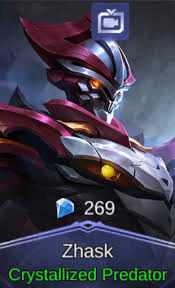
Crystallized Predator (Skin Zhask)
1/1
Crystallized Predator (Skin Zhask)
0.0
0 reviews
USD 3.20
Harga belum final
Minimal Beli:
1
Terjual
0 (0%)
Rata-Rata Kirim:
-
Deskripsi Produk
How to trade skins
Due to the 7 day friendship rule, specifically in the Mobile Legends category, sellers are allowed to change the order status to Sent before the order is sent
Therefore, make sure you have made a written agreement with the seller to wait 7 days (friendship time) plus 2 days (delivery time) after the seller changes the transaction status later. A total of 9 days is calculated after the status changes to Shipped. Always use the Messages feature to get in touch with the seller
Log in to the Mobile Legends Game
Update your Mobile Legends Game to the latest version
Before buying a skin, make sure that your account has reached level 20 and has been a friend with the seller ID for 7 days (minimum)
Fill in your in-game nickname, USER ID and Server Number correctly in the Transaction Information column
Wait for the skin to be sent by the seller
After you have received the skin, make sure that it is the skin you bought
If everything has been done, go to the Purchase History page and click the Done button to complete your order.
And don't forget to fill in the testimonials.
Thank You
Dinduts Shop
Due to the 7 day friendship rule, specifically in the Mobile Legends category, sellers are allowed to change the order status to Sent before the order is sent
Therefore, make sure you have made a written agreement with the seller to wait 7 days (friendship time) plus 2 days (delivery time) after the seller changes the transaction status later. A total of 9 days is calculated after the status changes to Shipped. Always use the Messages feature to get in touch with the seller
Log in to the Mobile Legends Game
Update your Mobile Legends Game to the latest version
Before buying a skin, make sure that your account has reached level 20 and has been a friend with the seller ID for 7 days (minimum)
Fill in your in-game nickname, USER ID and Server Number correctly in the Transaction Information column
Wait for the skin to be sent by the seller
After you have received the skin, make sure that it is the skin you bought
If everything has been done, go to the Purchase History page and click the Done button to complete your order.
And don't forget to fill in the testimonials.
Thank You
Dinduts Shop
Detail Penawaran


Dinduts
Terakhir online 13 hari lalu
Penjual tidak menerima pesanan
Kamu dapat melihat penjualan lainnya
Transaksi Aman dengan Trade Guard
Garansi Uang Kembali
Bantuan Customer Care 24/7
100% Transaksi Aman Dijamin oleh Trade Guard
Penjual sedang tidak menerima pesanan
Lihat Penjual Lainnya
04.3 / 5.0(3)
Detail Penawaran
Dinduts
Terakhir online 13 hari lalu
Penjual tidak menerima pesanan
Kamu dapat melihat penjualan lainnya
Transaksi Aman dengan Trade Guard
Garansi Uang Kembali
Bantuan Customer Care 24/7
100% Transaksi Aman Dijamin oleh Trade Guard
Penjual sedang tidak menerima pesanan
Lihat Penjual Lainnya
Masih mencari penawaran yang tepat?
Lihat Semua Penawaran