

Huge Easter Bunny

1/2

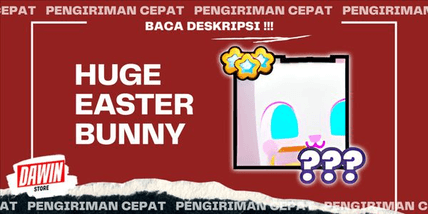
Huge Easter Bunny
0.0
0 reviews
USD 5.80
Harga belum final
Minimal Beli:
1
Terjual
0 (0%)
Rata-Rata Kirim:
-
Deskripsi Produk
Hi guys!
!!! Always check the message after making payment, to continue the transaction process!!!
*PROMOTION*
BONUS 10K GEMS FOR EVERY ITEM YOU PURCHASE (MULTIPLE APPLICABLE!!)
Make sure your Mailbox settings can receive the items you purchased.
(Enabled option: ON, the rest of the settings are just OFF)
As long as the shop and items are displayed online, it means Stock Ready.
FAQs? :
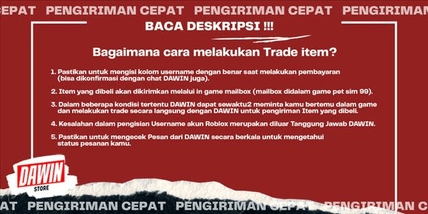
- How do I trade items?
1. Make sure to fill in the username column correctly when making payment (can be confirmed via DAWIN chat too).
2. Purchased items will be sent via the in-game mailbox (mailbox in the pet sim 99 game).
3. Under certain conditions, DAWIN may at any time ask you to meet in the game and trade directly with DAWIN for delivery of the purchased items.
4. Errors in filling in the Roblox account username are outside DAWIN's responsibility.
5. Make sure to check messages from DAWIN regularly to find out the status of your order.
- How do I Confirm Orders on my items?
1. Log in to my items account
2. Go to the Purchase Menu
3. Click Purchase History
4. On the order that has been sent and you have received, click the Finish button
5. After that, click Send, your order status is complete
!!! Always check the message after making payment, to continue the transaction process!!!
*PROMOTION*
BONUS 10K GEMS FOR EVERY ITEM YOU PURCHASE (MULTIPLE APPLICABLE!!)
Make sure your Mailbox settings can receive the items you purchased.
(Enabled option: ON, the rest of the settings are just OFF)
As long as the shop and items are displayed online, it means Stock Ready.
FAQs? :
- How do I trade items?
1. Make sure to fill in the username column correctly when making payment (can be confirmed via DAWIN chat too).
2. Purchased items will be sent via the in-game mailbox (mailbox in the pet sim 99 game).
3. Under certain conditions, DAWIN may at any time ask you to meet in the game and trade directly with DAWIN for delivery of the purchased items.
4. Errors in filling in the Roblox account username are outside DAWIN's responsibility.
5. Make sure to check messages from DAWIN regularly to find out the status of your order.
- How do I Confirm Orders on my items?
1. Log in to my items account
2. Go to the Purchase Menu
3. Click Purchase History
4. On the order that has been sent and you have received, click the Finish button
5. After that, click Send, your order status is complete
Detail Penawaran


DAWIN
Terakhir online 305 hari lalu
Penjual tidak menerima pesanan
Kamu dapat melihat penjualan lainnya
Transaksi Aman dengan Trade Guard
Garansi Uang Kembali
Bantuan Customer Care 24/7
100% Transaksi Aman Dijamin oleh Trade Guard
Penjual sedang tidak menerima pesanan
Lihat Penjual Lainnya
05.0 / 5.0(1.6K)
Detail Penawaran
DAWIN
Terakhir online 305 hari lalu
Penjual tidak menerima pesanan
Kamu dapat melihat penjualan lainnya
Transaksi Aman dengan Trade Guard
Garansi Uang Kembali
Bantuan Customer Care 24/7
100% Transaksi Aman Dijamin oleh Trade Guard
Penjual sedang tidak menerima pesanan
Lihat Penjual Lainnya
Masih mencari penawaran yang tepat?
Lihat Semua Penawaran