

Starter SEA, UL8 || cartethyia SIGN + ciaccona + changli
Starter SEA, UL8 || cartethyia SIGN + ciaccona + changli
0.0
(0 avaliação)
Todos os dados de login são criptografados. Só você e o vendedor conhecem os detalhes da conta. Troque a senha após a conclusão da transação.A conta é totalmente sua. Se em até 30 dias após a compra ela for hackeada ou recuperada, você recebe reembolso total.Encontre centenas de contas, incluindo contas raras difíceis de achar.
1/4


BRL 138.41
O preço ainda não é final
Compra Mínima:
1
Vendido
0 (0%)
Tempo Médio de Entrega:
-
Descrição do Produto
Região
-
Região:
-
Okay, here is the translation of the provided text:
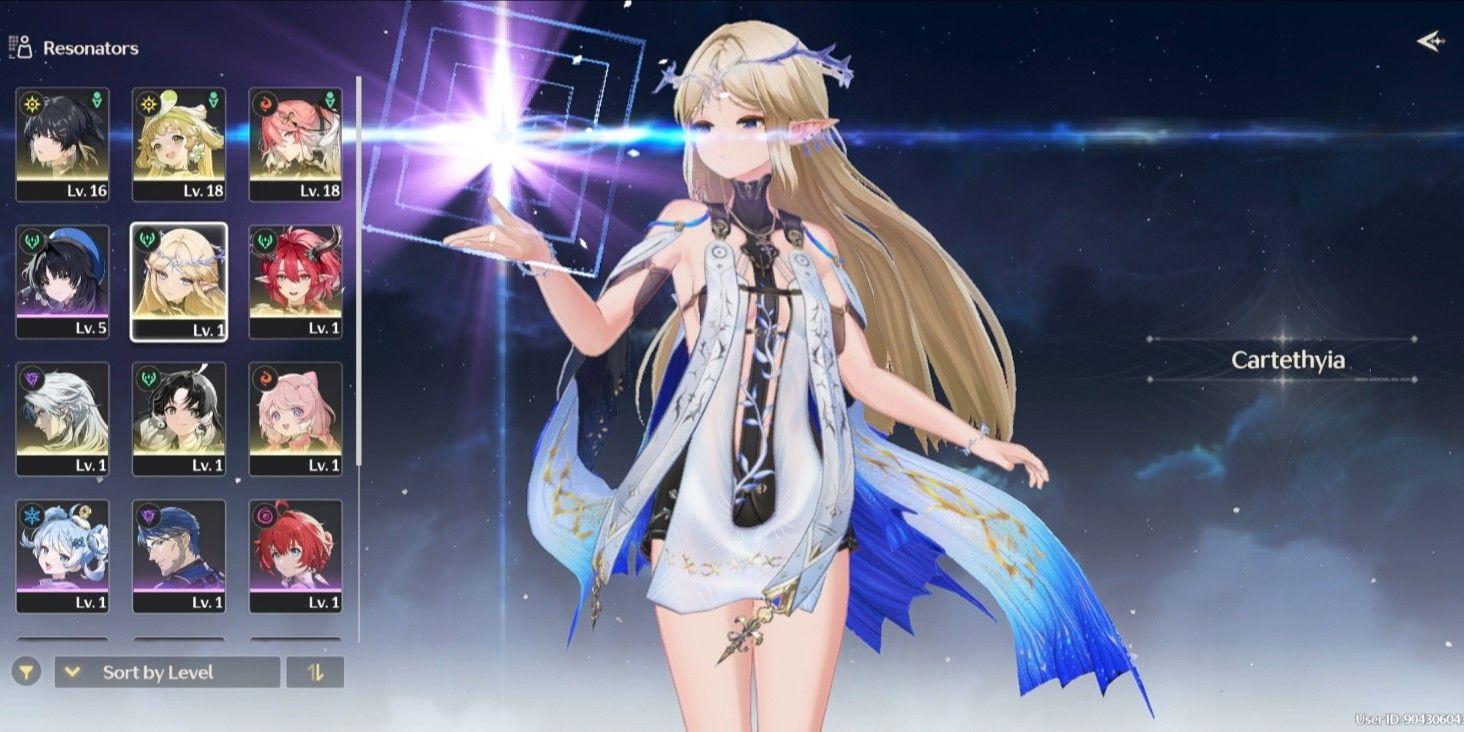
**Limited Resonators:**
* Cartethyia + signature weapon
* Ciaccona
* Changli
**Standard Resonators:**
* Verina
* Encore R1
* Calcharo
* Jianxin
**Account Description:**
* Starter Union Level 8
* SEA server
* Limited resonator banner rate-off
* Login via Kuro Games only
* Dummy Gmail (takeover required)
* Manually leveled (No cheats), & no third-party tools/plugins
* Account was created by the admin personally, & the admin is not a reseller, so the account is truly secure without any connection to other people.
* The remaining Astrite / Radiant Tide / Forging Tide can change; it may decrease or increase from what is shown in the picture. 🙏
♦️**How to secure the Gmail:**
* After purchasing, wait for the admin to send the account data, or you can also contact the admin directly so the account data can be sent quickly.
* After the admin sends the account data, check the account first to ensure the contents match the description of the account you bought.
* Once the account is checked and matches, then log into the Gmail on your device. Usually, when logging into Gmail, a code sent to the admin's device is needed, so message the admin again to request they select/allow that code.
* Once the admin clicks that code, the Gmail can then be logged into on the buyer's device. Just secure the Gmail by changing the Gmail password, and if needed, add a recovery phone number + recovery email.
* After that, just remove the admin's device (POCO F6). If needed, you can also ask the admin for a recording as proof that the Gmail was removed from their device.
* And done, the Gmail is secured. 👌
♦️**How to secure the Kuro Games account:**
* After securing the Gmail, just change the Kuro Games password by first opening the Wuthering Waves game.
* Before logging into the account, there is a "Forgot Password" menu below the login field; just click that menu.
* Then, enter the Kuro Games email address and click "Get Verification Code".
* Check the code received in the Gmail and enter it into the verification code field.
* Then enter the new password twice (top and bottom fields) and make sure these passwords are the same, guys, because if they are different it will fail.
* After that, click "Confirm" and done changing the Kuro Games password. 👌
**Limited Resonators:**
* Cartethyia + signature weapon
* Ciaccona
* Changli
**Standard Resonators:**
* Verina
* Encore R1
* Calcharo
* Jianxin
**Account Description:**
* Starter Union Level 8
* SEA server
* Limited resonator banner rate-off
* Login via Kuro Games only
* Dummy Gmail (takeover required)
* Manually leveled (No cheats), & no third-party tools/plugins
* Account was created by the admin personally, & the admin is not a reseller, so the account is truly secure without any connection to other people.
* The remaining Astrite / Radiant Tide / Forging Tide can change; it may decrease or increase from what is shown in the picture. 🙏
♦️**How to secure the Gmail:**
* After purchasing, wait for the admin to send the account data, or you can also contact the admin directly so the account data can be sent quickly.
* After the admin sends the account data, check the account first to ensure the contents match the description of the account you bought.
* Once the account is checked and matches, then log into the Gmail on your device. Usually, when logging into Gmail, a code sent to the admin's device is needed, so message the admin again to request they select/allow that code.
* Once the admin clicks that code, the Gmail can then be logged into on the buyer's device. Just secure the Gmail by changing the Gmail password, and if needed, add a recovery phone number + recovery email.
* After that, just remove the admin's device (POCO F6). If needed, you can also ask the admin for a recording as proof that the Gmail was removed from their device.
* And done, the Gmail is secured. 👌
♦️**How to secure the Kuro Games account:**
* After securing the Gmail, just change the Kuro Games password by first opening the Wuthering Waves game.
* Before logging into the account, there is a "Forgot Password" menu below the login field; just click that menu.
* Then, enter the Kuro Games email address and click "Get Verification Code".
* Check the code received in the Gmail and enter it into the verification code field.
* Then enter the new password twice (top and bottom fields) and make sure these passwords are the same, guys, because if they are different it will fail.
* After that, click "Confirm" and done changing the Kuro Games password. 👌
Detalhes da Oferta


Este vendedor não está aceitando pedidos no momento
Você pode tentar outro vendedor.
Transação Segura por Trade Guard
Garantia de Devolução do Dinheiro
Suporte 24/7
Este vendedor não está aceitando pedidos no momento
Ver Outros Vendedores
Detalhes da Oferta
Este vendedor não está aceitando pedidos no momento
Você pode tentar outro vendedor.
Transação Segura por Trade Guard
Garantia de Devolução do Dinheiro
Suporte 24/7
Este vendedor não está aceitando pedidos no momento
Ver Outros Vendedores
Ainda procurando a oferta certa?
Ver Todas as Ofertas