


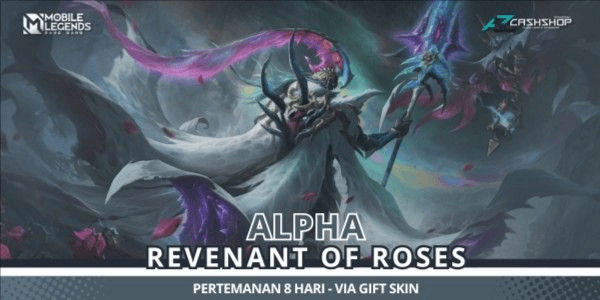
Revenant Of Roses (Legend Skin Alpha)
1/1
Revenant Of Roses (Legend Skin Alpha)
1.0
1 reviews
USD 116.73
Price is not final
Minimum Purchase:
1
Sold
2 (100%)
Average Delivery Time:
1 hour
Product Description
Notes & Terms and Conditions for Gift Skin:
- Must have been friends for at least 8 days.
- The recipient's account must be at level 20 or higher.
- Estimated gift delivery time is 8 days or more, depending on the queue (schedule is tentative).
- The fastest gift delivery process takes 8 days.
- Processing time may take longer, especially during Mobile Legends events.
Transaction Procedure:
1. Select the desired skin type and place your order.
2. Complete the payment for your order.
3. After payment is completed, send your order details via chat on Itemku or in the order description using the following format:
Order Format:
- Buyer's Name:
- User ID:
- Nickname:
- Order Type:
- Order Date:
4. After submitting the order format, the admin will provide the sender's account ID for the item/skin. Please add that account as a friend and confirm to the admin by including a screenshot after adding the sender's account.
5. The admin will enter your order data into the processing queue.
6. Wait until the specified date for the skin to be sent to you.
7. Please note that the skin gifting process through the gift system cannot be completed quickly. If you want a faster process, it is recommended to use Diamonds directly.
8. After receiving the skin, confirm the receipt of your order and provide an honest product review.
- Must have been friends for at least 8 days.
- The recipient's account must be at level 20 or higher.
- Estimated gift delivery time is 8 days or more, depending on the queue (schedule is tentative).
- The fastest gift delivery process takes 8 days.
- Processing time may take longer, especially during Mobile Legends events.
Transaction Procedure:
1. Select the desired skin type and place your order.
2. Complete the payment for your order.
3. After payment is completed, send your order details via chat on Itemku or in the order description using the following format:
Order Format:
- Buyer's Name:
- User ID:
- Nickname:
- Order Type:
- Order Date:
4. After submitting the order format, the admin will provide the sender's account ID for the item/skin. Please add that account as a friend and confirm to the admin by including a screenshot after adding the sender's account.
5. The admin will enter your order data into the processing queue.
6. Wait until the specified date for the skin to be sent to you.
7. Please note that the skin gifting process through the gift system cannot be completed quickly. If you want a faster process, it is recommended to use Diamonds directly.
8. After receiving the skin, confirm the receipt of your order and provide an honest product review.
Product Review
1/5
1 Review
5
0
4
0
3
0
2
0
1
1
Product Review
View All1/5
1 Rating
5
0
4
0
3
0
2
0
1
1

No reviews yet for this product rating
Offer Details

AR Concept
Last online 105 days ago
This Seller isn’t Taking Orders Right Now
You can try another seller.
100% Secure Payments Guaranteed by Trade Guard
This Seller isn’t Taking Orders Right Now
Check Other Sellers
04.8 / 5.0(252)
Offer Details
AR Concept
Last online 105 days ago
This Seller isn’t Taking Orders Right Now
You can try another seller.
100% Secure Payments Guaranteed by Trade Guard
This Seller isn’t Taking Orders Right Now
Check Other Sellers
Still looking for the right offer?
See All Offers