


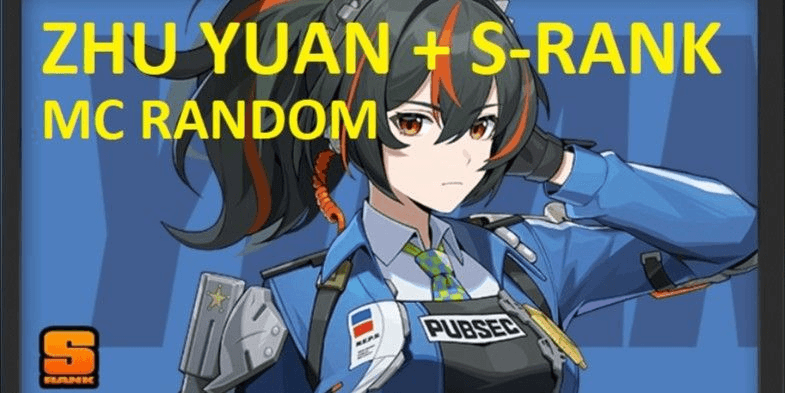
Account Zhu Yuan Starter [MC FEMALE][ASIA]
1/1
Account Zhu Yuan Starter [MC FEMALE][ASIA]
5.0
205 reviews
USD 1.17
Price is not final
 Instant
Minimum Purchase:
1
Sold
506 (100%)
Average Delivery Time:
-
Product Description
MUST READ THE DESCRIPTION BELOW !!
HIGH SECURITY RISK HOYOVERSE ACCOUNT, PURCHASE = TAKE RISK
- One device must use no more than 1 Hoyoverse account
- Ensure the device to be used is not affected by "TOO MANY REQUESTS"
- Use the "cloudmoon" app if you want to use more than 1 account or if affected by "TMR" (download on Play Store)
- If "TOO MANY REQUESTS" appears immediately during initial login, contact admin via message
- When CHANGING EMAIL and CHANGING PASSWORD, some Hoyo security systems may activate "TOO MANY REQUESTS" TMR or "too many requests"
- Link the "OUTLOOK/HOTMAIL" email you received with your own email (fill in alternate email) and change the password to ensure 100% security
- If you want to CHANGE EMAIL, you MUST wait until "TMR" completely disappears by trying to change it daily, max 2 attempts per day to avoid account block.
(Generally, after a new patch update, the too many requests issue will disappear)
- WE DO NOT ACCEPT COMPLAINTS CAUSED BY THE BUYER !!!!
!!!!!!!!!!!!!!!!!!!!!!!!!!!!!!!!!!!!! PURCHASE = AGREE TO ALL TERMS ABOVE !!!!!!!!!!!!!!!!!!!!!!!!!!!!!!!!!!!!!!!!!!!!!
EMAIL & PASSWORD AUTOMATICALLY SENT IN YOUR ORDER'S [ACCOUNT DATA / VOUCHER CODE] 24/7 NON-STOP
ACCOUNT CONTAINS:
CHARACTERS
S-RANK ZHU YUAN
S-RANK STANDARD [RANDOM] CANNOT CHOOSE
(ASIA SERVER)
ACCOUNT LEVEL 4-8
MC RANDOM
Login: email and password only [can change email]
Birthday/Username ALL unset
Never top-up
Email is Outlook/Hotmail with full access
ACCOUNT DATA FORMAT:
EMAIL----GAME PASSWORD----EMAIL PASSWORD
(THE ---- SYMBOL IS ONLY A SEPARATOR)
HOW TO LOGIN TO EMAIL:
1. Open Microsoft Outlook website/app [turn on VPN before opening]
2. Enter EMAIL and EMAIL PASSWORD
3. If the email is locked, contact admin via message to unlock or select "Next" and enter your phone number to unlock the email yourself (if "try another method" appears, contact admin for assistance and do not try repeatedly)
HOW TO LOGIN IN-GAME ZZZ:
1. Login to email [see email login method above]
2. Open ZZZ app
3. Enter EMAIL and GAME PASSWORD
4. Send code
5. Check the code in the logged-in email (wait if the code hasn’t appeared, do not spam to avoid being blocked!)
6. Enter the code and login
7. After checking the contents, MUST change EMAIL PASSWORD to ensure 100% security
NOTES:
- IF EXPERIENCING OTHER ISSUES NOT COVERED IN THE ABOVE DESCRIPTION, MUST NOTIFY ADMIN FIRST VIA MESSAGE. ADMIN WILL HELP AS MUCH AS POSSIBLE [PLEASE BE PATIENT, SOMETIMES ADMIN IS SLOW TO RESPOND]
ADMIN ACTIVE HOURS: 08:00 - 21:00 [TIME MAY VARY]
HIGH SECURITY RISK HOYOVERSE ACCOUNT, PURCHASE = TAKE RISK
- One device must use no more than 1 Hoyoverse account
- Ensure the device to be used is not affected by "TOO MANY REQUESTS"
- Use the "cloudmoon" app if you want to use more than 1 account or if affected by "TMR" (download on Play Store)
- If "TOO MANY REQUESTS" appears immediately during initial login, contact admin via message
- When CHANGING EMAIL and CHANGING PASSWORD, some Hoyo security systems may activate "TOO MANY REQUESTS" TMR or "too many requests"
- Link the "OUTLOOK/HOTMAIL" email you received with your own email (fill in alternate email) and change the password to ensure 100% security
- If you want to CHANGE EMAIL, you MUST wait until "TMR" completely disappears by trying to change it daily, max 2 attempts per day to avoid account block.
(Generally, after a new patch update, the too many requests issue will disappear)
- WE DO NOT ACCEPT COMPLAINTS CAUSED BY THE BUYER !!!!
!!!!!!!!!!!!!!!!!!!!!!!!!!!!!!!!!!!!! PURCHASE = AGREE TO ALL TERMS ABOVE !!!!!!!!!!!!!!!!!!!!!!!!!!!!!!!!!!!!!!!!!!!!!
EMAIL & PASSWORD AUTOMATICALLY SENT IN YOUR ORDER'S [ACCOUNT DATA / VOUCHER CODE] 24/7 NON-STOP
ACCOUNT CONTAINS:
CHARACTERS
S-RANK ZHU YUAN
S-RANK STANDARD [RANDOM] CANNOT CHOOSE
(ASIA SERVER)
ACCOUNT LEVEL 4-8
MC RANDOM
Login: email and password only [can change email]
Birthday/Username ALL unset
Never top-up
Email is Outlook/Hotmail with full access
ACCOUNT DATA FORMAT:
EMAIL----GAME PASSWORD----EMAIL PASSWORD
(THE ---- SYMBOL IS ONLY A SEPARATOR)
HOW TO LOGIN TO EMAIL:
1. Open Microsoft Outlook website/app [turn on VPN before opening]
2. Enter EMAIL and EMAIL PASSWORD
3. If the email is locked, contact admin via message to unlock or select "Next" and enter your phone number to unlock the email yourself (if "try another method" appears, contact admin for assistance and do not try repeatedly)
HOW TO LOGIN IN-GAME ZZZ:
1. Login to email [see email login method above]
2. Open ZZZ app
3. Enter EMAIL and GAME PASSWORD
4. Send code
5. Check the code in the logged-in email (wait if the code hasn’t appeared, do not spam to avoid being blocked!)
6. Enter the code and login
7. After checking the contents, MUST change EMAIL PASSWORD to ensure 100% security
NOTES:
- IF EXPERIENCING OTHER ISSUES NOT COVERED IN THE ABOVE DESCRIPTION, MUST NOTIFY ADMIN FIRST VIA MESSAGE. ADMIN WILL HELP AS MUCH AS POSSIBLE [PLEASE BE PATIENT, SOMETIMES ADMIN IS SLOW TO RESPOND]
ADMIN ACTIVE HOURS: 08:00 - 21:00 [TIME MAY VARY]
Product Review
5/5
205 Review
5
200
4
4
3
1
2
0
1
0
Product Review
View All5/5
205 Rating
5
200
4
4
3
1
2
0
1
0

No reviews yet for this product rating
Offer Details

Bunny Project shop
Last online 2 hours ago
This Seller isn’t Taking Orders Right Now
You can try another seller.
100% Secure Payments Guaranteed by Trade Guard
This Seller isn’t Taking Orders Right Now
Check Other Sellers
Offer Details
Bunny Project shop
Last online 2 hours ago
This Seller isn’t Taking Orders Right Now
You can try another seller.
100% Secure Payments Guaranteed by Trade Guard
This Seller isn’t Taking Orders Right Now
Check Other Sellers
Still looking for the right offer?
See All Offers