

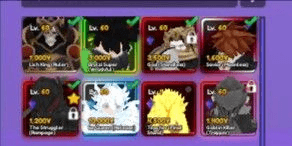
AKUN 8 MONARCH / SHINY HUNTER + VIP GAMEPASS
1/2


AKUN 8 MONARCH / SHINY HUNTER + VIP GAMEPASS
0.0
0 reviews
USD 40.70
Price is not final
Minimum Purchase:
1
Sold
0 (0%)
Average Delivery Time:
-
Product Description
Select an account from the available listings and make a purchase.
Make payment for your order.
Wait for the seller to provide the username/email and password for the account, or you can check the order details page to see the username/email and password sent by the seller.
Ensure the seller sends the RBL account data and the email account data.
Once sent, please verify by logging into RBL.
Open the Settings menu, then click Account Info. Check the Email Address section. Make sure the email address provided by the seller matches the one linked to the RBL account.
In Account Info, change the Username, Password (make sure to use uppercase and lowercase letters, symbols, and numbers), and enter a Phone Number.
Go to the Settings menu, then click Security. Then enter a PIN and enable 2-Step Verification.
Open the email provided by the seller, secure the email account immediately, and enable 2-Step Verification.
Make sure your account specifications are correct (Avatar items, game items and level, Game Pass, etc.).
If everything is done, the transaction is successful. Go to the Purchase History page and click the Finish button to complete your order.
Make payment for your order.
Wait for the seller to provide the username/email and password for the account, or you can check the order details page to see the username/email and password sent by the seller.
Ensure the seller sends the RBL account data and the email account data.
Once sent, please verify by logging into RBL.
Open the Settings menu, then click Account Info. Check the Email Address section. Make sure the email address provided by the seller matches the one linked to the RBL account.
In Account Info, change the Username, Password (make sure to use uppercase and lowercase letters, symbols, and numbers), and enter a Phone Number.
Go to the Settings menu, then click Security. Then enter a PIN and enable 2-Step Verification.
Open the email provided by the seller, secure the email account immediately, and enable 2-Step Verification.
Make sure your account specifications are correct (Avatar items, game items and level, Game Pass, etc.).
If everything is done, the transaction is successful. Go to the Purchase History page and click the Finish button to complete your order.
Offer Details


Rayhan r store
Last online 55 days ago
This Seller isn’t Taking Orders Right Now
You can try another seller.
Secure Transaction by Trade Guard
Money-Back Guarantee
24/7 Support
100% Secure Payments Guaranteed by Trade Guard
This Seller isn’t Taking Orders Right Now
Check Other Sellers
05.0 / 5.0(54)
Offer Details
Rayhan r store
Last online 55 days ago
This Seller isn’t Taking Orders Right Now
You can try another seller.
Secure Transaction by Trade Guard
Money-Back Guarantee
24/7 Support
100% Secure Payments Guaranteed by Trade Guard
This Seller isn’t Taking Orders Right Now
Check Other Sellers
Still looking for the right offer?
See All Offers