


Akun Reroll SIAP GACHA Starter [Europe] - 2
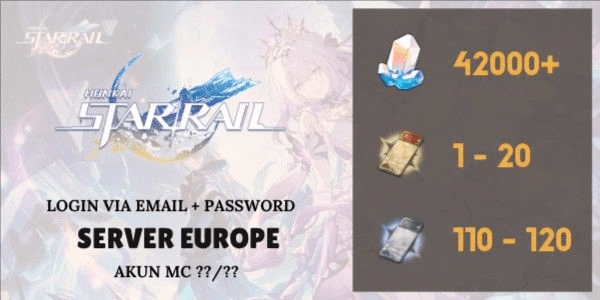
1/1
Akun Reroll SIAP GACHA Starter [Europe] - 2
0.0
0 reviews
USD 13.49
Price is not final
Minimum Purchase:
1
Sold
0 (0%)
Average Delivery Time:
-
Product Description
Read:
[Notes] Hoyoverse accounts will 100% log in via "Outlook/Hotmail" in the future. Username login accounts are only leftover accounts (Check the image for details on which login method is used).
[Notes] 1 device can only log in to a total of 2-3 accounts. More than that may result in "Too many requests" or "Terlalu banyak permintaan." Reinstall the game by deleting and downloading it again.
[Notes] Logging into a new device usually prevents immediate email and password changes (but you can try changing them after checking the account).
[Notes] Issues with changing email/password due to "Too many requests" are recommended to be resolved by playing for 7 days (or more) to adapt to the new device.
Read (For Hotmail/Outlook Login Only):
[Notes] Do not spam verification codes, as the account may get hit with "Too many requests" and require a 2-4 hour wait to log in again. Try logging into the email first to prepare the code.
[Notes] If the verification code doesn’t appear, check the Spam folder in your email.
[Notes] For issues with changing email/password, try securing the Hotmail first by logging in and immediately binding it to a personal email.
[Notes] If Outlook/Hotmail gets locked, wait 1-3 days. Avoid spamming login attempts, as it may be flagged as a threat/spam from a new device, prolonging the lock.
[Notes] You can contact the admin to unlock Hotmail, but not all Hotmail accounts can be unlocked immediately. If it can’t be unlocked right away, you "must" wait 1-3 days.
[Notes] Avoid frequent logging in/out or switching accounts. This will definitely trigger "too many requests" for all Hoyoverse accounts.
[Notes] As long as stock is available, it means it’s ready (instant delivery here). Purchases are automatically sent to the purchase history.
[Notes] Account data is in the format "Email----Game Password---Email Password" or "Email----Game/Email Password."
[Notes] Sometimes fast response, sometimes slow response. The store being online doesn’t necessarily mean it’s open for chat (could be restocking, adding new items, etc.).
[Notes] No spam chatting. Chats are replied to starting from the oldest first.
[Notes] Hoyoverse accounts will 100% log in via "Outlook/Hotmail" in the future. Username login accounts are only leftover accounts (Check the image for details on which login method is used).
[Notes] 1 device can only log in to a total of 2-3 accounts. More than that may result in "Too many requests" or "Terlalu banyak permintaan." Reinstall the game by deleting and downloading it again.
[Notes] Logging into a new device usually prevents immediate email and password changes (but you can try changing them after checking the account).
[Notes] Issues with changing email/password due to "Too many requests" are recommended to be resolved by playing for 7 days (or more) to adapt to the new device.
Read (For Hotmail/Outlook Login Only):
[Notes] Do not spam verification codes, as the account may get hit with "Too many requests" and require a 2-4 hour wait to log in again. Try logging into the email first to prepare the code.
[Notes] If the verification code doesn’t appear, check the Spam folder in your email.
[Notes] For issues with changing email/password, try securing the Hotmail first by logging in and immediately binding it to a personal email.
[Notes] If Outlook/Hotmail gets locked, wait 1-3 days. Avoid spamming login attempts, as it may be flagged as a threat/spam from a new device, prolonging the lock.
[Notes] You can contact the admin to unlock Hotmail, but not all Hotmail accounts can be unlocked immediately. If it can’t be unlocked right away, you "must" wait 1-3 days.
[Notes] Avoid frequent logging in/out or switching accounts. This will definitely trigger "too many requests" for all Hoyoverse accounts.
[Notes] As long as stock is available, it means it’s ready (instant delivery here). Purchases are automatically sent to the purchase history.
[Notes] Account data is in the format "Email----Game Password---Email Password" or "Email----Game/Email Password."
[Notes] Sometimes fast response, sometimes slow response. The store being online doesn’t necessarily mean it’s open for chat (could be restocking, adding new items, etc.).
[Notes] No spam chatting. Chats are replied to starting from the oldest first.
Offer Details


Syeonix
Last online 1 hour ago
This Seller isn’t Taking Orders Right Now
You can try another seller.
100% Secure Payments Guaranteed by Trade Guard
This Seller isn’t Taking Orders Right Now
Check Other Sellers
Offer Details
Syeonix
Last online 1 hour ago
This Seller isn’t Taking Orders Right Now
You can try another seller.
100% Secure Payments Guaranteed by Trade Guard
This Seller isn’t Taking Orders Right Now
Check Other Sellers
Still looking for the right offer?
See All Offers