


OTT NAVIGATOR PREMIUM IPTV 30 DAYS
1/2


OTT NAVIGATOR PREMIUM IPTV 30 DAYS
4.9
43 reviews
USD 0.67
Price is not final
Minimum Purchase:
1
Sold
123 (92%)
Average Delivery Time:
9 hours
Product Description
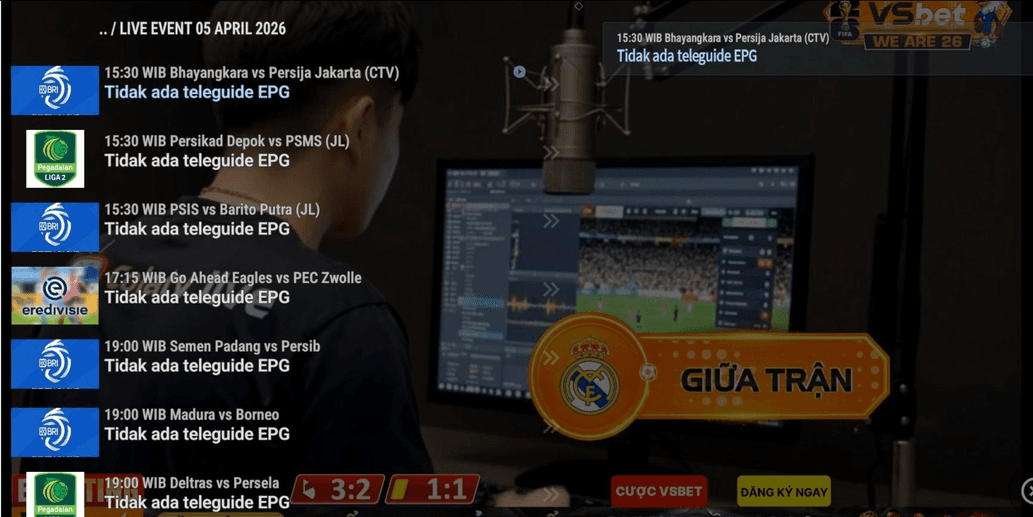
OTT NAVIGATOR IS AN IPTV STREAMING APPLICATION THAT USES THE INTERNET
FEATURES
✅️ COMPLETE CHANNELS 1000+ CHANNELS
✅️ FULL HD
✅️ MOST COMPREHENSIVE SPORTS
✅️ AFFORDABLE PRICE
WE SEND THE PLAYLIST FROM OTT NAVIGATOR TO WATCH MANY BROADCASTS AND MOVIES, BOTH LOCAL AND INTERNATIONAL
How to Use OTT Navigator:
1. Installation: Download from the Google Play Store on Android TV, STB, or Android phones.
2. Add Playlist: Open the app, select "Add Provider."
3. Input Data: Choose an input method (e.g., "Playlist File/URL" or "Xtream Codes"). Enter the M3U URL or account data from your IPTV service provider.
4. Configuration: Wait for the channel loading process to complete. You can set up groups, edit channels, and mark favorites.
5. Streaming: Select the channel you want to watch from the list that appears.
Additional Tips:
- Settings: You can configure themes, channel order, and groups according to your preference.
- Backup: Use the backup feature to save playlist settings.
* Ensure your internet connection is stable for smooth HD streaming results.
FEATURES
✅️ COMPLETE CHANNELS 1000+ CHANNELS
✅️ FULL HD
✅️ MOST COMPREHENSIVE SPORTS
✅️ AFFORDABLE PRICE
WE SEND THE PLAYLIST FROM OTT NAVIGATOR TO WATCH MANY BROADCASTS AND MOVIES, BOTH LOCAL AND INTERNATIONAL
How to Use OTT Navigator:
1. Installation: Download from the Google Play Store on Android TV, STB, or Android phones.
2. Add Playlist: Open the app, select "Add Provider."
3. Input Data: Choose an input method (e.g., "Playlist File/URL" or "Xtream Codes"). Enter the M3U URL or account data from your IPTV service provider.
4. Configuration: Wait for the channel loading process to complete. You can set up groups, edit channels, and mark favorites.
5. Streaming: Select the channel you want to watch from the list that appears.
Additional Tips:
- Settings: You can configure themes, channel order, and groups according to your preference.
- Backup: Use the backup feature to save playlist settings.
* Ensure your internet connection is stable for smooth HD streaming results.
Product Review
4.9/5
43 Review
5
38
4
4
3
1
2
0
1
0
Latest Reviews
Product Review
View All4.9/5
43 Rating
5
38
4
4
3
1
2
0
1
0
Offer Details


Clasher 999
Last online 5 days ago
This Seller isn’t Taking Orders Right Now
You can try another seller.
100% Secure Payments Guaranteed by Trade Guard
This Seller isn’t Taking Orders Right Now
Check Other Sellers
04.9 / 5.0(1.2K)
Offer Details
Clasher 999
Last online 5 days ago
This Seller isn’t Taking Orders Right Now
You can try another seller.
100% Secure Payments Guaranteed by Trade Guard
This Seller isn’t Taking Orders Right Now
Check Other Sellers
Still looking for the right offer?
See All Offers