


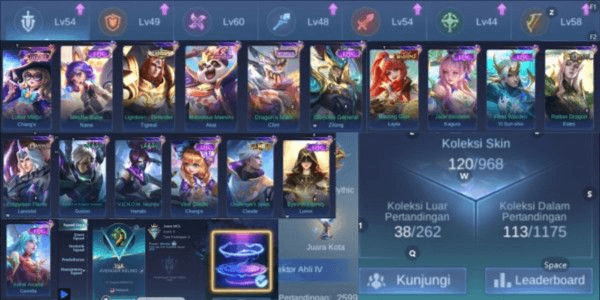
(833) MLBB Account Epic Sea Of Anvil Recall, Max Lead SQ Emblem 1, Limit Change, Skin Equivalent to Epic 16
(833) MLBB Account Epic Sea Of Anvil Recall, Max Lead SQ Emblem 1, Limit Change, Skin Equivalent to Epic 16
1/1
(833) MLBB Account Epic Sea Of Anvil Recall, Max Lead SQ Emblem 1, Limit Change, Skin Equivalent to Epic 16
5.0
1 reviews
USD 10.35
Price is not final
 Instant
Minimum Purchase:
1
Sold
1 (100%)
Average Delivery Time:
-
Product Description
Winrate
49%
Number of Skins
120
Number of Heroes
79
Current Rank
Mythic
Account Bound to
Moonton
Hero's Name
Miya
Winrate:
49%
Number of Skins:
120
Number of Heroes:
79
Current Rank:
Mythic
Account Bound to:
Moonton
Hero's Name:
Miya
Here is the d text:
---
**Email/password Moonton = email/password Hotmail:**
[email protected]
**Moonton Password:** 130177oK
Please check the account first. If there are any login issues or other problems, report them to the admin immediately. After verifying and confirming the account is correct, please change the Moonton password.
### How to Log in to Mobile Legends Account:
- Click on **Profile**
- Go to **Account Settings**
- Select **Switch Account**
- Choose **Moonton Account**
- Make sure the email and password capitalization matches what the admin provided
- If a verification code is required to access the account, log in to the email via **http://hotmail.com**, using the Moonton email and password
### How to Log in to Hotmail via Gmail App:
- Open **Gmail**
- At the top corner, click the initial/profile icon
- Select **Add Another Account**
- Choose **Outlook, Hotmail, and Live**
- Log in
- Secure the account
***Note:**
(The Moonton email and Hotmail email are the same.)
### How to Change Moonton Password:
- Log in to the game
- Click on **Profile**
- Go to **Account Settings**
- On the top right, select **Switch Account**, then choose **Moonton Account**
- Click **Forgot Moonton Password**
- Enter the Moonton email used
- A password reset email will be sent
- Change the password as desired
- Done
### How to Secure the Account if Contacted by GM:
- Log in to **Hotmail**
- Click the circle with initials at the top right corner
- Select **My Microsoft Account**
- Change Password
- For additional security, go to **Security**, check **Recent Activity**, and remove any unrecognized devices
- Don’t forget to **add a recovery email** for extra security
- Ensure no one else logs into the account except the buyer—check **Login History** and match history for suspicious activity. If found, **chat in **.
---
Let me know if you need any modifications!
---
**Email/password Moonton = email/password Hotmail:**
[email protected]
**Moonton Password:** 130177oK
Please check the account first. If there are any login issues or other problems, report them to the admin immediately. After verifying and confirming the account is correct, please change the Moonton password.
### How to Log in to Mobile Legends Account:
- Click on **Profile**
- Go to **Account Settings**
- Select **Switch Account**
- Choose **Moonton Account**
- Make sure the email and password capitalization matches what the admin provided
- If a verification code is required to access the account, log in to the email via **http://hotmail.com**, using the Moonton email and password
### How to Log in to Hotmail via Gmail App:
- Open **Gmail**
- At the top corner, click the initial/profile icon
- Select **Add Another Account**
- Choose **Outlook, Hotmail, and Live**
- Log in
- Secure the account
***Note:**
(The Moonton email and Hotmail email are the same.)
### How to Change Moonton Password:
- Log in to the game
- Click on **Profile**
- Go to **Account Settings**
- On the top right, select **Switch Account**, then choose **Moonton Account**
- Click **Forgot Moonton Password**
- Enter the Moonton email used
- A password reset email will be sent
- Change the password as desired
- Done
### How to Secure the Account if Contacted by GM:
- Log in to **Hotmail**
- Click the circle with initials at the top right corner
- Select **My Microsoft Account**
- Change Password
- For additional security, go to **Security**, check **Recent Activity**, and remove any unrecognized devices
- Don’t forget to **add a recovery email** for extra security
- Ensure no one else logs into the account except the buyer—check **Login History** and match history for suspicious activity. If found, **chat in **.
---
Let me know if you need any modifications!
Product Review
5/5
1 Review
5
1
4
0
3
0
2
0
1
0
Latest Reviews
Product Review
View All5/5
1 Rating
5
1
4
0
3
0
2
0
1
0
Offer Details


ViperCircles
Last online 4 days ago
This Seller isn’t Taking Orders Right Now
You can try another seller.
100% Secure Payments Guaranteed by Trade Guard
This Seller isn’t Taking Orders Right Now
Check Other Sellers
04.8 / 5.0(1.0K)
Offer Details
ViperCircles
Last online 4 days ago
This Seller isn’t Taking Orders Right Now
You can try another seller.
100% Secure Payments Guaranteed by Trade Guard
This Seller isn’t Taking Orders Right Now
Check Other Sellers
Still looking for the right offer?
See All Offers