


Zenless Zone Zero Zzz-1 Account
1/1
Zenless Zone Zero Zzz-1 Account
4.9
225 reviews
USD 9.27
Price is not final
Minimum Purchase:
1
Sold
669 (99%)
Average Delivery Time:
-
Product Description
Please read the product description first.
Buying means you agree. No complaints accepted if you don't know how to log in.
How to Log In:
1. Open a browser, log in to Hotmail.
2. Open the game, log in to the account, check the code sent to Hotmail.
3. Enter the game and check the account.
4. Do not change the Hotmail email. If you want to change the email in the game, go to settings and change the game email.
5. The login process is complicated! After payment, you will receive a tutorial. Follow all the steps in the tutorial.
The tutorial explains everything. We will not reply again! Do not be lazy and skip reading the tutorial, causing problems.
Since this game is complicated, logging in will definitely be complicated. If you cannot accept this, do not buy.
Account Contents:
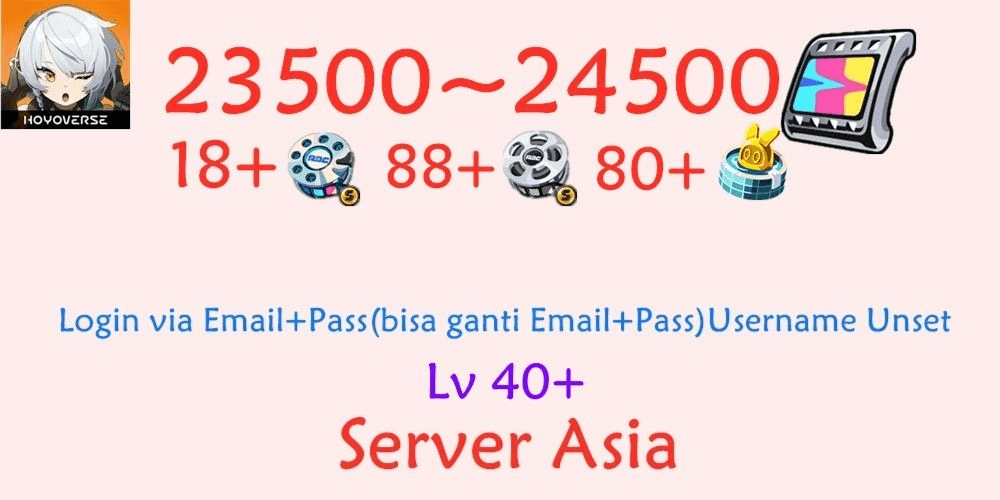
• Server: Asia
• Gems and Tickets match the main image
• Level matches the main image
• Login via Email + Password (email can be changed), Username not set
• Starter Warp/Gacha 50-pull is still fresh and unused
Please Read:
❗️One device can only log in to a total of 2 accounts. If more than 2, you may encounter a 'Too many requests' error. You will need to delete the game and reinstall it.
❗️If an account fails to log in 3 times (3 verification code sends), the account may get a 'Too many requests' error and you must wait 2–4 hours before you can log in and send a verification code again. So, you should log in to the email first to prepare the code for checking.
❗️When logging into an account on a new device, you usually cannot immediately change the email and password (you can try changing after checking the account). If you change the email and password, you may get a 'Too many requests' error. It is recommended to log in fully for 7 days on one device before trying again. Usually, it takes 3–7 days to change the email and password, and at most 10 days. However, you will eventually be able to change all data.
So, if you cannot change the email and password immediately, how do you secure the account?
❗️Log in to Hotmail, then immediately bind Hotmail to your personal email. Then, go to the top right, click Account, and change the password (change the language at the bottom left).
This way, others cannot log in to this Hotmail account or get the code to log in to the game. You just need to wait another 3–7 days to try changing the email and password in the game.
Buying means you agree. No complaints accepted if you don't know how to log in.
How to Log In:
1. Open a browser, log in to Hotmail.
2. Open the game, log in to the account, check the code sent to Hotmail.
3. Enter the game and check the account.
4. Do not change the Hotmail email. If you want to change the email in the game, go to settings and change the game email.
5. The login process is complicated! After payment, you will receive a tutorial. Follow all the steps in the tutorial.
The tutorial explains everything. We will not reply again! Do not be lazy and skip reading the tutorial, causing problems.
Since this game is complicated, logging in will definitely be complicated. If you cannot accept this, do not buy.
Account Contents:
• Server: Asia
• Gems and Tickets match the main image
• Level matches the main image
• Login via Email + Password (email can be changed), Username not set
• Starter Warp/Gacha 50-pull is still fresh and unused
Please Read:
❗️One device can only log in to a total of 2 accounts. If more than 2, you may encounter a 'Too many requests' error. You will need to delete the game and reinstall it.
❗️If an account fails to log in 3 times (3 verification code sends), the account may get a 'Too many requests' error and you must wait 2–4 hours before you can log in and send a verification code again. So, you should log in to the email first to prepare the code for checking.
❗️When logging into an account on a new device, you usually cannot immediately change the email and password (you can try changing after checking the account). If you change the email and password, you may get a 'Too many requests' error. It is recommended to log in fully for 7 days on one device before trying again. Usually, it takes 3–7 days to change the email and password, and at most 10 days. However, you will eventually be able to change all data.
So, if you cannot change the email and password immediately, how do you secure the account?
❗️Log in to Hotmail, then immediately bind Hotmail to your personal email. Then, go to the top right, click Account, and change the password (change the language at the bottom left).
This way, others cannot log in to this Hotmail account or get the code to log in to the game. You just need to wait another 3–7 days to try changing the email and password in the game.
Product Review
4.9/5
225 Review
5
216
4
7
3
1
2
0
1
1
Latest Reviews
Product Review
View All4.9/5
225 Rating
5
216
4
7
3
1
2
0
1
1
Offer Details


Dw27
Last online 30 minutes ago
This Seller isn’t Taking Orders Right Now
You can try another seller.
100% Secure Payments Guaranteed by Trade Guard
This Seller isn’t Taking Orders Right Now
Check Other Sellers
Offer Details
Dw27
Last online 30 minutes ago
This Seller isn’t Taking Orders Right Now
You can try another seller.
100% Secure Payments Guaranteed by Trade Guard
This Seller isn’t Taking Orders Right Now
Check Other Sellers
Still looking for the right offer?
See All Offers